
PerfectTablePlan v7.3.0 is now available
This release adds enhancements and bug fixes to PerfectTablePlan v7.2.1.
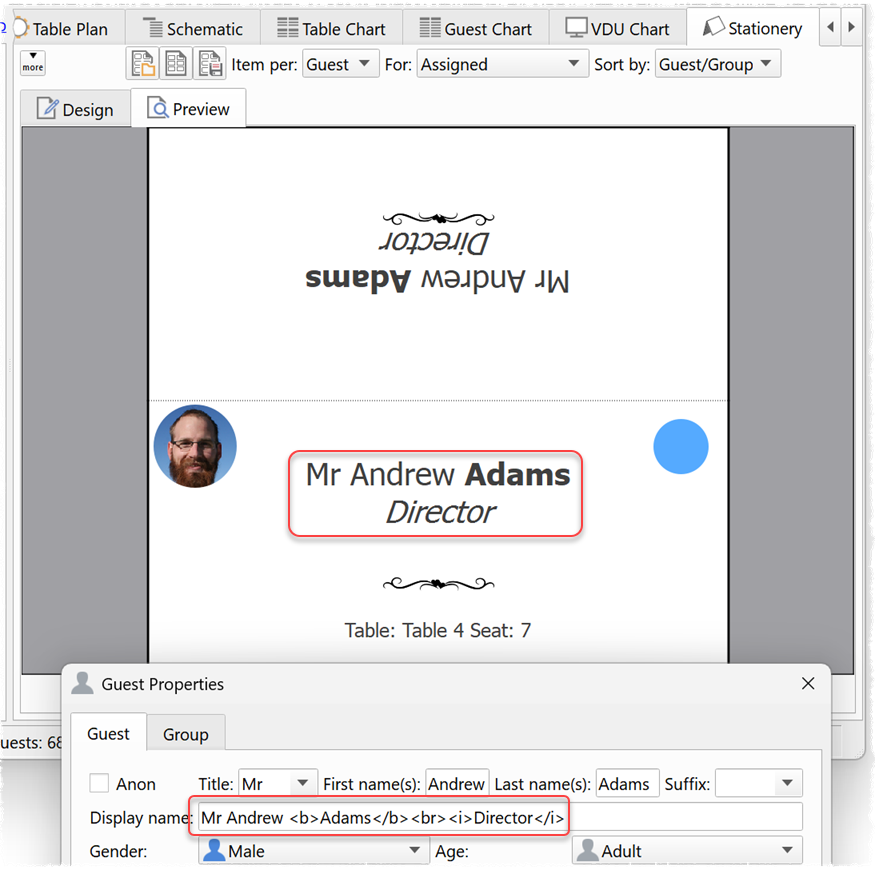
- HTML can now be used in the Stationery pane to add bold, italic and line breaks to text.
- Support has been added for WEBP format images files.
- Improvements to warnings during guest list import.
- Bug fixes.
Click the button below to find out more and download v7.3.0.
This is a free upgrade for everyone with a valid v7 licence. If you previously purchased a v7 licence you can have it resent here.
If you have a v6 or earlier licence, you can upgrade to v7 with a 60% discount here.
If you don’t have a licence you can purchase one here.
Thanks to everyone who sent us bug reports and suggestions for improvements. Please let us know if you have any issues with this release.
AI
AI, AI, AI … is all we seem to hear about these days.
PerfectTablePlan is created by humans, for humans. We are using AIs to assist us with some limited programming and research tasks, but humans remain very much in control. And we won’t be passing your private data to any AIs.
The current generation of AIs are large language models (LLMs). These are not well suited to combinatorial problems, such as seating plans. And we don’t expect this to change any time soon. Combinatorial problems are hard*. There are more ways to seat 60 guests in 60 seats (60! = 60 x 59 x 58 … x 1) than there are atoms in the observable universe. The number of possible seats for 1000 guests in 1000 seats is a truly mind-boggling number. It requires specialist techniques to compute solutions to these problems in a sensible time frame. Perhaps LLMs (or Quantum computers) will be able to compute seating plans one day. But don’t hold your breath.
*NP-hard for fellow computer nerds.
macOS 27
Apple recently released macOS 27 ‘Golden Gate’. We came across no problems testing PerfectTablePlan v7.3.0 on macOS 27.
Note that you will need to download load the Rosetta 2 software if you want to run an old Intel version of PerfectTablePlan on macOS 27 (see below).
Support for Intel Macs and binaries
Apple started shipping Macs with ARM (M Series Apple Silicon) processors in 2020.
Prior to PerfectTablePlan v6.1.2 we only supported Intel binaries on Mac.
From v6.1.2 PerfectTablePlan ships as a ‘universal binary’ that supports both Intel and ARM processors.
Apple is withdrawing support for Intel binaries in macOS 28 (planned for 2028). So, PerfectTablePlan v6.1.1 and earlier will not run on macOS 28.
If you have a PerfectTablePlan v5 (or earlier) licence, you will need to upgrade to the latest version of PerfectTablePlan to keep using it on macOS 28.
If you have a PerfectTablePlan v6 licence, you will hopefully be able to run PerfectTablePlan v6.1.2 or later on macOS 28. But we can’t be sure until macOS 28 is available for testing.
If you have a PerfectTablePlan v7 licence, you should be fine on macOS 28.
Upgrading to v7
If you are still using PerfectTablePlan v6 (or earlier!) then you are missing a lot of new features. For a brief summary, see the v7 improvements page.
Click the button below to upgrade an individual licence from v6 (or earlier) to v7:
If you have multiple licences or an organizational licence, email us for a quote.
If you have any questions about upgrading to v7, please read the upgrade FAQ. If that doesn’t answer your question, please email us.
And finally…
The seating plans for US-China banquets reveal a lot about the changing dynamics of power. It is noticeable that a lot more tech billionaires were seated at the top table at the latest event:
Billionaires Musk And Jensen Huang Among Those Seated With Trump And Xi At State Dinner
Compared to previous events:
The delicate choreography of the Trump-Xi state dinner
Andy Brice
Oryx Digital Ltd
25-Sep-2026