This release adds bug fixes and improvements to PerfectTablePlan v7.1.2. You will require a v7 licence key to unlock the full functionality. v7 is a paid upgrade from v6 (free if you purchased v6 within 3 months of v7 being released). You can buy a new licence key here (or upgrade from a previous version here). See also our upgrade FAQ.
We recommend that you back-up important plan files before installing any new release.
The download links are at the bottom of the page.
Backward/forward compatibility
This version can read plan (.tp) files saved by any earlier version of PerfectTablePlan. But reading v7 plans into v6 (or earlier) may lose some data.
System requirements
| Windows | Mac | |
| OS versions |
Windows 11, 64 bit, Intel processor Windows 10 v1809 or later, 64 bit, Intel processor Windows 11, 64 bit, ARM processor |
macOS 26 to 11.x, ARM M series or Intel processor |
All editions
Windows and Mac
1. There is a new Catering report in the Report pane. This shows meal selection by table, guest and course, and also show special requirements. It can handle any number of courses. Thanks to Mark P. for suggesting this.
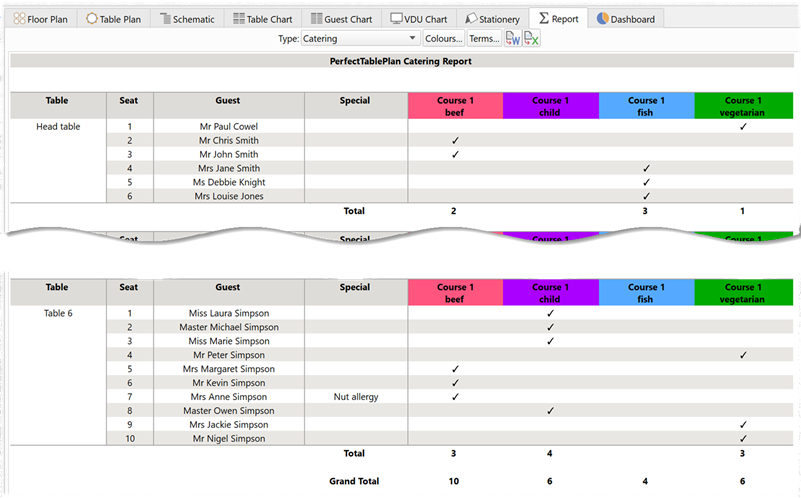
Note that, if a meal has multiple courses, the courses should be separated by commas in the Meal field. E.g. ‘soup,bangers and smash,ice cream’.
You can export this report to various formats, such as Excel and PDF, if you want to modify it or share it.
2. There is an additional unassigned guests with a meal check in the Troubleshooting report. This will list the names of any unassigned guests who have a meal choice set.
3. There is an additional assigned guests with a different number of meal courses check in the Troubleshooting report. If guests with meal choices do not all have the same number of courses (separated by commas), then guests will be listed by the number of courses.
4. The order in which members of a group are displayed in the Table Chart, Guest Chart and Stationery panes can be changed in the Group Properties window (or the Group tab of the Guest Properties window) since v7.1.0. However this change was sometimes lost when the plan file is saved and re-opened. This issue is now fixed. Thanks to Paul T. for reporting this.
5. The order in which the members of a group are listed in the Table Chart, Guest Chart and Stationery panes can change when a v6 (or earlier) plan is read into v7. We have made a fix to minimize this issue, but the order could still vary for members of a group that have the same vip status, age, last name and gender. Thanks to Paul T. for reporting this.
6. The first time you drag a guest between groups, a warning tells you that the guest will be added last in the member order.
7. The first time you click on a seat in a row of seats, balloon help tells you than you need to drag at either end to move the row of seats.