
Please ensure that your Mac fulfils the minimum system requirements. If not, you may need to upgrade the operating system or try it on a different Mac.
Garbage text appears in the browser when I try to download
PerfectTablePlan is packaged as a standard .dmg file. Some older browsers, such as Microsoft Internet Explorer, do not seem able to handle .dmg files correctly. Try using an up-to-date browser, such as Safari.
"You can't open the Application PerfectTablePlan because it is not supported on this type of Mac"
PerfectTablePlan v5 onward does not support Macs with PowerPC processors, Macs with 32 bit Intel processors or versions of macOS older than 10.7. Contact us to find out about getting a key for an earlier version of PerfectTablePlan that does support these.
PerfectTablePlan can't be opened because it is not from the Mac App Store
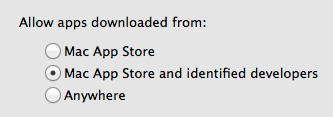
PerfectTablePlan is not available in the Mac App Store. Change System Preferences>Security & Privacy>General>Allow apps downloaded from to Mac App Store and identified developers. You can always change it back to Mac App Store later.
I can't start PerfectTablePlan after install
Typically the PerfectTablePlan icon will bounce up and down a few times and then disappear. If this happens please do the following:
- Try to restart PerfectTablePlan by double clicking on the icon in the Applications folder.
- Start the Console.App applications in the Applications/Utilities folder.
- Copy and paste the last few lines of text from Console.App into an email to support@perfecttableplan.com.
We may be able to figure out the problem from the console output.
If all else fails...
Please email us at support@perfecttableplan.com.